AI-Powered Analytics: Complete Guide for SaaS & ISVs 2026

Alim Goulamhoussen
Publié le 06.02.26
Mis à jour le 19.03.26
10 min
TL;DR
AI-powered analytics transforms how SaaS companies deliver insights. Instead of building complex dashboards, users ask questions in plain text and get instant answers. For ISVs: faster time-to-market (weeks vs. months), 3-5x higher user adoption, and new revenue opportunities through premium analytics features.
Key takeaways:
- Conversational analytics lets non-technical users query data naturally
- AI-generated dashboards eliminate weeks of manual configuration
- Building in-house takes 12-18 months; embedded platforms deliver in 4-8 weeks
- Expected ROI: 5-10x in Year 1 for mid-market ISVs
What is AI-Powered Analytics?
Think about how your customers interact with data today. They open a dashboard, scroll through charts, try to remember what each metric means, maybe apply a few filters. It works, but it's not exactly intuitive—especially if they're not data analysts.
AI-powered analytics flips this model. Instead of navigating pre-built dashboards, users simply ask questions: "Which customers are at risk of churning?" or "Show me revenue trends by region." The AI understands the question, queries the right data, generates the appropriate visualization, and explains what it found.
This isn't just a chatbot slapped onto your existing BI tool. It's a fundamental rethinking of how people interact with data.
The Three Pillars of AI Analytics
Natural Language Processing (NLP) forms the first pillar. The system understands business questions, not just SQL queries. When someone asks about "Q4 performance," it knows they mean the last quarter of the fiscal year, which products to include, and which metrics matter for their role.
Machine Learning for Intelligence provides the second pillar. Pattern recognition happens automatically. The system spots anomalies ("Your conversion rate dropped 15% last week"), identifies trends ("Enterprise customers typically upgrade in month 3"), and surfaces insights users didn't know to look for.
Generative AI for Visualization completes the foundation. The right chart type gets selected automatically. Bar chart for comparisons, line chart for trends, geographic map for regional data.
Why This Matters for SaaS Companies in 2026
Your customers don't want analytics. They want answers.
When you embed AI-powered analytics into your product, you're fundamentally changing how customers derive value from your platform. They go from "Let me check if this data is available" to "Tell me what I need to know."
The impact shows up in three places:
- Product differentiation: Your competitors have static dashboards. You have an AI analyst.
- User adoption: Conversational analytics see 3-5x higher engagement than traditional dashboards
- Revenue expansion: Premium AI analytics features create natural upsell opportunities
One ISV customer saw 40% of users ask at least one question within the first week. Their previous dashboard product? 12% activation rate over the same period.
AI-Powered Analytics vs Traditional Embedded Analytics
When Traditional Analytics Still Makes Sense
AI isn't always the answer. Traditional embedded dashboards work well when regulatory compliance requires specific visualizations that can't vary, operational workflows demand consistent layouts for daily monitoring, or the data model is extremely complex.
Most successful implementations combine both: AI for exploration and ad-hoc questions, traditional dashboards for operational monitoring.
Types of AI-Powered Analytics
1. Conversational Analytics (The Core)
Users type or speak questions and get answers — this is what we cover in depth in our guide to conversational analytics. The technical challenge is understanding ambiguous business language. When someone says "revenue," do they mean gross, net, ARR, MRR? The system needs a semantic layer that maps business terms to actual data definitions. For a deeper look at how NLQ handles this ambiguity, see our article on natural language query in analytics.
2. AI-Generated Dashboards
Instead of manually dragging widgets onto a canvas for hours, describe what you want: "Create a customer health dashboard with usage metrics, support ticket trends, and contract renewal dates." The AI handles the rest. We break down exactly what generative AI unlocks for analytics in a dedicated article.
Reality check: This works well for standard use cases (sales dashboards, customer analytics, financial reporting). It struggles with highly specialized visualizations. Think of it as an 80% solution.
3. Automated Insights & Anomaly Detection
The system actively monitors your data and alerts you to important changes. No queries required. "Your North America conversion rate dropped 22% this week" or "Enterprise deal velocity is 40% faster than usual this quarter."
4. Predictive Analytics & Forecasting
Machine learning models predict future outcomes: churn prediction, revenue forecasting, inventory optimization. This requires significant historical data and ongoing model maintenance—most companies adopt this after mastering conversational features first.
How AI-Powered Analytics Works
Here's what happens when a user asks: "Which features have the highest adoption among enterprise customers?"
Step 1: Natural Language Processing - The NLP engine parses the question, extracts entities ("features," "enterprise customers"), classifies intent, and checks user permissions.
Step 2: Semantic Layer Translation - Maps business language to database schema. "Features" → feature_usage table. "Enterprise customers" → customers table where tier = 'enterprise'. Your data team defines these mappings once; the AI uses them for every query.
Step 3: Query Generation & Execution - The AI writes the SQL query, applies security filters (row-level and column-level), and executes against your data warehouse with caching for speed.
Step 4: Visualization Intelligence - Selects appropriate chart type based on data characteristics, number of data points, and user context (mobile vs. desktop).
Step 5: Natural Language Response - Generates text explanation: "Your top 3 features by enterprise adoption are: Dashboard Builder (89%), API Access (76%), and SSO Integration (71%)."
Key Features to Evaluate
When evaluating platforms, focus on:
Natural Language Query Support - Can users ask questions in their own words? Do they handle ambiguous questions, synonyms, follow-up questions, and typos?
Getting this right also depends on product design choices — our AI design principles for SaaS covers what separates features that get adopted from those that get ignored.
Multi-Tenant Architecture - Each customer sees only their data, automatically filtered. Non-negotiable for ISVs. Learn more about <a href="#multi-tenant-architecture">multi-tenant analytics architecture</a>.
Embedded & White-Label Capabilities - Full branding control with SSO/SAML integration, JavaScript/Mobile SDKs, and API access.
Governance & Security - RBAC, row-level security, audit logging, and data lineage.
Performance at Scale - How fast are responses with 50+ concurrent users and 10M+ rows? According to Databricks' benchmarking study, query caching is critical for sub-second response times.
For a full breakdown of how AI works within a multi-tenant embedded architecture, see our AI in embedded analytics guide.
Build vs Buy: The Framework
Consider building in-house when:
- Your data model is genuinely unique
- You have 3+ experienced ML engineers full-time
- You're willing to invest 12-18 months
- Analytics is your core product value
- Budget: $500K-$1M+ annually for maintenance
Consider buying (embedded platform) when:
- You want capabilities in 4-8 weeks, not 18 months
- Your team should focus on core product
- You need white-label, multi-tenant, secure analytics without building from scratch
- You want to offload infrastructure and updates
A McKinsey study found 70% of enterprise AI projects fail to move beyond pilot stage, primarily due to underestimating operational complexity.
The hybrid approach: Start with an embedded platform to ship fast. Build custom components only for genuinely unique requirements.
For a direct comparison of what you gain and lose on each path, read our AI embedded analytics vs traditional BI breakdown.
AI Analytics Platforms Comparison 2026
For a more detailed breakdown of each platform including pricing, implementation time, and use case fit, see our full comparison of AI embedded analytics tools.
Toucan AI
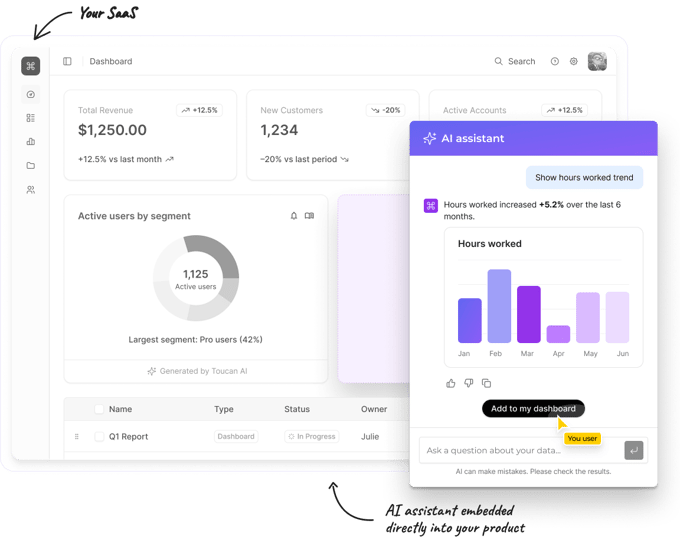
Best for: ISVs who need embedded, white-labeled AI analytics without extensive ML engineering resources
Strengths:
- Purpose-built for embedded use cases with strong multi-tenancy
- Conversational analytics in 40+ languages (critical for global SaaS)
- Pre-built semantic layer templates (4-6 weeks implementation)
- Flexible deployment (cloud or self-hosted)
Trade-offs: Smaller brand recognition than legacy BI players; less extensive third-party ecosystem than Microsoft/Google
Pricing: Custom based on embedded instances and query volume
ThoughtSpot
Best for: Enterprises with dedicated data teams and complex analytical requirements
Mature "search-driven" analytics predating the current AI wave. Strong governance features, extensive connector library, and GPT-powered "SpotIQ" for natural language queries. Higher price point oriented toward enterprise deployments with steeper learning curve. Implementation typically requires 2-3 months for embedded contexts.
Best fit: F500 companies or late-stage startups ($100M+ ARR) with complex data environments. Less suitable for mid-market ISVs needing quick time-to-market.
Omni
Best for: Developer-first teams comfortable with code-based configuration
Takes a "BI as code" approach using YAML for dashboard definitions. Strong Git integration enables version control with a modern, clean interface. Recently added AI query capabilities.
Strengths: Infrastructure-as-code patterns appeal to technical teams; modern interface; version control native to the platform.
Trade-offs: Requires technical users for dashboard creation (less "no-code"); smaller platform with fewer pre-built features; AI capabilities are newer and less mature; white-label support limited compared to purpose-built embedded platforms.
Best fit: Technical product teams who prefer infrastructure-as-code patterns and are comfortable with hands-on configuration.
Luzmo
Best for: Fast embedded analytics implementation with self-service dashboard building
Purpose-built for embedded analytics with strong multi-tenancy. Rapid implementation typically takes 2-4 weeks. User-friendly dashboard builder works for non-technical users with competitive pricing for mid-market ISVs.
Trade-offs: AI/NLP capabilities are newer and less advanced than AI-first platforms. Conversational analytics limited compared to Toucan.ai or ThoughtSpot. Less suitable for complex analytical requirements.
Best fit: ISVs who need standard embedded dashboards quickly and are less focused on cutting-edge AI capabilities. See our Toucan vs Luzmo comparaison table.
Upsolve AI
Best for: Startups prioritizing speed and simplicity over advanced features
Quick setup with claims of "analytics in minutes." Modern, minimalist interface focused on ease of use for non-technical users. Lower price point appeals to early-stage companies.
Strengths: Fast implementation; simplified feature set reduces complexity; affordable entry point for startups.
Trade-offs: Limited white-label customization (vendor branding often visible); smaller feature set focuses on essentials only; less robust multi-tenant architecture for enterprise customers; newer company with less enterprise support infrastructure.
Best fit: Seed to Series A startups who need basic embedded analytics fast and aren't yet concerned with enterprise-grade features or extensive customization.
Key Differentiators for Toucan AI in Embedded Context:
- Multilingual conversational AI – Query in 40+ languages, critical for global SaaS companies
- Semantic layer templates by industry – Pre-configured business definitions for SaaS, fintech, healthtech accelerate implementation
- Flexible deployment – Cloud, self-hosted, or hybrid for data sovereignty requirements
- True white-label – Complete removal of vendor branding, not just logo swapping
- ISV-focused roadmap – Product development driven by embedded use cases, not internal BI
Best Practices for Implementation
1. Invest in Your Semantic Layer First
This is the most important success factor. Your AI is only as good as its understanding of your business vocabulary. Map business terms to data, define metrics consistently, document edge cases. Spend 2-3 weeks on this—it prevents months of "wrong answer" issues.
This is the most important success factor. We dedicated an entire article to why the semantic layer is non-negotiable for embedded AI — worth reading before you start.
2. Design for Non-Technical Users
Good prompts: "Show me customers at risk of churning" or "What's driving the revenue increase this month?"
Bad prompts: "Query the accounts table where last_login_date < current_date - 30" or "Calculate the 90-day moving average of DAU"
If users need to understand your data model to ask questions, the AI has failed.
Our AI design principles guide walks through the 5 patterns that drive adoption — and the 3 failure modes to avoid.
3. Implement Strong Governance from Day One
Define who can see what data (row-level security by tenant), who can create dashboards, who can share insights externally, and what sensitive data requires extra protection. One ISV launched without proper tenant isolation—Customer A accidentally queried Customer B's data within a week.
4. Combine AI with Traditional Dashboards
Use AI for exploratory questions and ad-hoc analysis. Use traditional dashboards for operational monitoring and compliance reports. This hybrid approach drives highest adoption.
5. Monitor AI Performance
Track query success rate (target: 70%+), rephrasing frequency, feature adoption (target: 40-60%), and time to insight (target: <2 minutes). If success rate is below 70%, improve your semantic layer. If adoption is below 30%, you have a UX problem.
How you architect your AI backend directly affects these numbers. See how we moved from a monolithic LLM to a multi-agent system to improve reliability at scale.
The Future of AI Analytics: 2026 and Beyond
Multimodal Analytics - Voice input, image understanding, video analysis. OpenAI's GPT-4 with Vision makes this feasible now.
Agentic Analytics - AI that takes actions, not just answers questions. Automated workflows triggered by data changes, proactive recommendations, self-optimizing dashboards.
Building reliable agentic systems requires strict engineering discipline — our type-safety patterns for production AI covers the architecture patterns that make this stable.
Real-Time Collaborative Analytics - Multiple users in shared AI analytics sessions maintaining conversation context. "Google Docs for data analysis."
Industry-Specific AI Models - Vertical-specific models that understand healthcare, fintech, or manufacturing nuance dramatically improve accuracy for specialized use cases.
Enhanced AI Governance - The European AI Act and similar frameworks require transparency, bias detection, and audit trails. Gartner predicts 75% of enterprise AI deployments will include built-in governance by 2026.
Conclusion: Is AI Analytics Right for Your SaaS Product?
You should consider AI analytics if:
- Customers ask for data but don't engage with existing dashboards
- You're spending significant engineering time on custom analytics
- Current embedded BI adoption is below 30%
- You're competing against vendors with AI features
- Your data model is relatively standard
You can wait if:
- Current analytics has >60% active adoption
- You have genuinely unique requirements generic AI can't handle
- You're pre-revenue with more urgent priorities
- Data infrastructure is still immature
For most SaaS companies in 2026, the question isn't "if" but "when." The technology has crossed from experimental to proven. User expectations are rising—when ChatGPT works for everything else, why can't I just ask my product questions about my data?
The ISVs moving fastest treat AI analytics as a strategic differentiator, not a feature checkbox. They embed it deeply into workflows, iterate based on usage data, and use conversational interfaces to fundamentally rethink how customers derive value from their platforms.
Request a demo to see how Toucan AI can transform your embedded analytics strategy.
FAQ