AI Conversational Analytics: Ask Questions, Get Instant Insights

Alim Goulamhoussen
Publié le 12.02.26
Mis à jour le 19.03.26
7 min
TL;DR
AI conversational analytics transforms how teams and users interact with data. Instead of building dashboards or writing SQL, users simply ask questions in natural language—"What's our churn rate this month?" or "Which features drive retention?"—and get instant visual answers. It's making analytics accessible to everyone, not just data experts.
Key takeaways:
- Ask questions in plain text, get instant insights
- 3-5x higher adoption than traditional BI tools
- Cuts time-to-insight from days to seconds
- Works for product, sales, finance, customer success teams
- Embedded directly into SaaS products for customer-facing use
What is AI Conversational Analytics?
Remember the last time you needed a quick answer from your data? Maybe you wanted to know which customers are most at risk of churning, or which marketing campaigns are actually working. You probably did one of two things: spent 20 minutes building a report yourself, or sent a Slack message to your data team and waited.
AI conversational analytics changes that completely. It's part of the broader shift toward AI-powered embedded analytics that's transforming how teams interact with data.
It's a way to interact with your data using natural language—the same way you'd ask a colleague a question. You type "Show me revenue by region for Q4" and instantly get a chart. No SQL. No dashboard building. No waiting for the data team.
The AI understands your question, knows which data to query, generates the right visualization, and explains what it means. Solutions like Toucan combine guided analytics with conversational capabilities, making insights accessible to everyone—not just data experts. With features like self-service analytics and native embedding, teams can explore data freely while maintaining governance.
Our complete guide to AI-powered analytics covers the full picture — conversational analytics is one of three core pillars.
What makes it different from traditional BI?
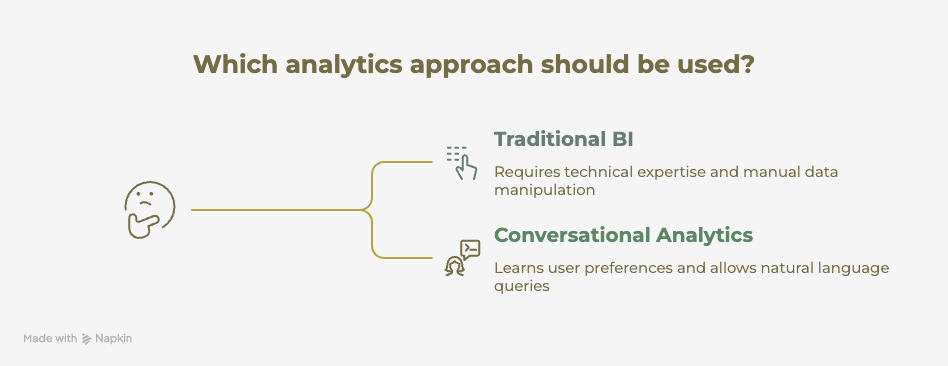
Traditional business intelligence tools require you to:
- Know where the data lives
- Understand how to query it
- Choose which chart type to use
- Learn the tool's interface and workflows
You're expected to learn the tool. With conversational analytics, the tool learns to understand you.
You're not clicking through menus or dragging fields into columns. You're having a conversation. And if the first answer isn't quite right, you can refine your question naturally: "Actually, show me just enterprise customers" or "Break that down by product line."
Why AI Conversational Analytics is Transforming Business Intelligence
The data team bottleneck is real. In most companies, a handful of analysts support hundreds of people who need insights. The result? Most business questions never get answered, or they get answered too late to matter.
Data democratization that actually works
We've been talking about "democratizing data" for years, but it's mostly been aspirational. Self-service BI tools promised to solve this, but they just shifted the complexity from IT to business users. Now instead of learning SQL, people had to learn Tableau or Power BI—still a significant barrier.
Conversational analytics is the first approach that truly delivers on the promise. When a product manager can ask "Which features correlate with trial-to-paid conversion?" and get an answer in 10 seconds, that's real democratization.
Speed matters more than we think
The time between having a question and getting an answer shapes how teams work. When insights take days, people plan around that delay. They:
- Batch their questions
- Make decisions with incomplete information
- Stop asking exploratory questions altogether
When insights are instant, the entire rhythm of work changes:
- Meetings become more data-driven because anyone can pull up real-time numbers
- Product teams can validate hunches immediately
- Sales leaders can spot trends as they emerge, not weeks later
The compound effect of this speed is huge. A team that can answer 10x more questions doesn't just work faster—they make fundamentally better decisions because they have more information to work with.
Breaking the data dependency
Every organization has data gatekeepers, and honestly, it makes sense. Data can be messy, confusing, and easy to misinterpret. But the gatekeeping creates its own problems.
When business teams need to go through analysts for every question, several things happen:
- Simple questions take longer than they should
- Analysts spend time on repetitive requests instead of deep analysis
- Business teams stop exploring the data because the friction is too high
AI conversational analytics maintains governance and accuracy while removing the friction. The AI understands your semantic layer—what "revenue" means, which customers are "active," how "churn" is calculated. It enforces the same definitions your data team would use. But it does it instantly, for everyone, at the same time.
How AI Conversational Analytics Actually Works
The magic of asking questions in plain English and getting accurate answers requires several layers working together. According to Gartner, natural language processing in analytics is one of the top technology trends transforming business intelligence.
.png?width=656&height=630&name=AI%20Conversational%20Analytics_%20Ask%20Questions%2c%20Get%20Instant%20Insights%20-%20visual%20selection%20(1).png)
1. The AI interprets your question. Natural language processing breaks down your question to understand intent. "Show me our top customers" gets parsed differently than "Why did revenue drop last month?" One is asking for a list, the other is asking for analysis.
2. It maps to your data model. The AI needs to know your business context. What does "customer" mean in your organization? Which table contains revenue data? How is "last month" calculated in your system? This happens through a semantic layer that translates business terms into database queries.
This translation layer is the heart of what's called natural language query — and getting it right is what separates accurate answers from confident wrong ones.
3. It generates the right visualization. Not every question needs a chart. Some answers are better as:
- Tables for detailed data
- Single numbers for key metrics
- Written explanations for context
The AI decides based on what you're asking and what will communicate the answer most clearly.
4. It explains the results. A good answer includes context. "Revenue increased 23% because three enterprise deals closed in December" is more useful than just showing a chart with an upward trend.
A real interaction looks like this
User: "How many trial users signed up this week?"
AI: [Shows number: 247] "You had 247 trial signups this week, up 18% from last week. Most came from organic search (132) and product-led growth (89)."
User: "Show me the trend for the past month"
AI: [Shows line chart] "Trial signups have been growing steadily, with an average of 221 per week over the past month. The spike on November 15th (+47%) aligns with your product launch."
User: "Which features do they try first?"
AI: [Shows horizontal bar chart] "The most-used first features are dashboard creation (68% of trials), data connections (45%), and sharing (31%)."
Notice how the conversation flows naturally. The user doesn't need to start over each time—the AI maintains context and understands follow-up questions.
How AI Conversational Analytics Compares to Traditional BI
Let's be direct about where conversational analytics fits in your analytics stack, because it's not replacing everything.
Conversational vs. Traditional BI
Choosing an AI Conversational Analytics Platform
Not all conversational analytics platforms are the same. Some are bolted-on chatbots that struggle with complex questions. For a detailed breakdown of which platforms do this well, see our comparison of the best AI embedded analytics tools. Others require significant data engineering to set up. Here's what matters when evaluating options:
Accuracy of the AI interpretation is everything. A system that misunderstands your questions or returns wrong answers quickly loses trust. Look for platforms that leverage semantic layers and allow you to define business terms precisely.
Quality of the generated visualizations varies wildly. Some tools just default to bar charts for everything. The best platforms understand which chart type communicates each type of answer most effectively.
Embeddability and white-labeling matter if you're a SaaS company. Can you integrate this into your product under your brand? Can customers only see their own data?
Governance and security are non-negotiable. You need:
- Row-level security
- Permission management
- Audit trails
The conversational interface can't become a backdoor to sensitive data.
Speed of responses impacts adoption. If users wait 30 seconds for an answer, they'll stop asking. Sub-3-second responses are ideal.
Platform comparison
Toucan leads for embedded, customer-facing use cases. It's designed for ISVs who want to add conversational analytics to their SaaS products. The guided analytics foundation means you're not choosing between curated and conversational—you get both. Strong governance layer, natural white-labeling, fast implementation.
ThoughtSpot is strong for large enterprises doing internal analytics. Their "search" paradigm works well, though it requires users to learn their specific syntax. More of an investment to implement but powerful once configured. For a detailed comparison, see our Toucan vs ThoughtSpot analysis.
Power BI Q&A works if you're already deep in the Microsoft ecosystem. It's improving but still feels like a feature rather than a core capability. Best for teams that live in Excel and PowerPoint.
Tableau Ask Data is solid for exploration by analysts who already know Tableau. Less accessible for non-technical users. The learning curve is lower than building dashboards but still exists.
Domo's Natural Language capabilities are decent for existing Domo customers, but it's not the primary way most teams use the platform.
Why Toucan leads for embedded use cases
If you're a SaaS company adding analytics to your product, Toucan's approach makes the most sense. You get conversational capabilities built on top of guided analytics, so customers can explore freely but still have curated views for common needs.
The semantic layer is product-aware, meaning you define metrics once and they're consistent across guided dashboards and conversational queries. The white-labeling is native, not an afterthought. And the implementation timeline is weeks, not quarters.
What's Next for Conversational Analytics
The technology is evolving fast. Here's what's emerging:
Proactive AI that doesn't wait for questions. "Your churn rate spiked 15% this week—here's why" appears in your inbox without you asking. The AI monitors your KPIs and surfaces notable changes automatically. This is one of the three capabilities that generative AI unlocks for analytics — alongside chart generation from intent and non-linear data exploration.
Forrester predicts that proactive analytics will become standard by 2027.
Voice-activated analytics are coming. Imagine asking questions during a meeting without even opening a laptop. Early implementations are already working in mobile apps.
Multi-modal responses that combine:
- Text explanations
- Visualizations
- Video walkthroughs
Instead of just showing a chart, the AI might generate a short explanation video for complex topics.
Predictive follow-ups where the AI suggests the next logical question. After answering "What's our revenue by region?", it might offer:
- "Would you like to see how this compares to last quarter?"
- "Should I break this down by product line?"
Collaborative analytics where multiple team members can build on each other's questions in a shared conversation. The context persists across the team, not just for individuals.
At Toucan, we're working on making conversational analytics even more context-aware for embedded use cases. The AI should understand not just what you're asking, but who you are, which features you use, and what outcomes you care about. That level of personalization is the next frontier.