Looker Pricing: How Much Does Looker Really Cost in 2026?

Alim Goulamhoussen
Publié le 22.01.26
Mis à jour le 02.06.26
10 min
If you've been researching Looker pricing, you've probably noticed something frustrating. There's no straightforward answer anywhere. Google's official pricing page tells you to "contact sales," and community forums are filled with speculation and second-hand information.
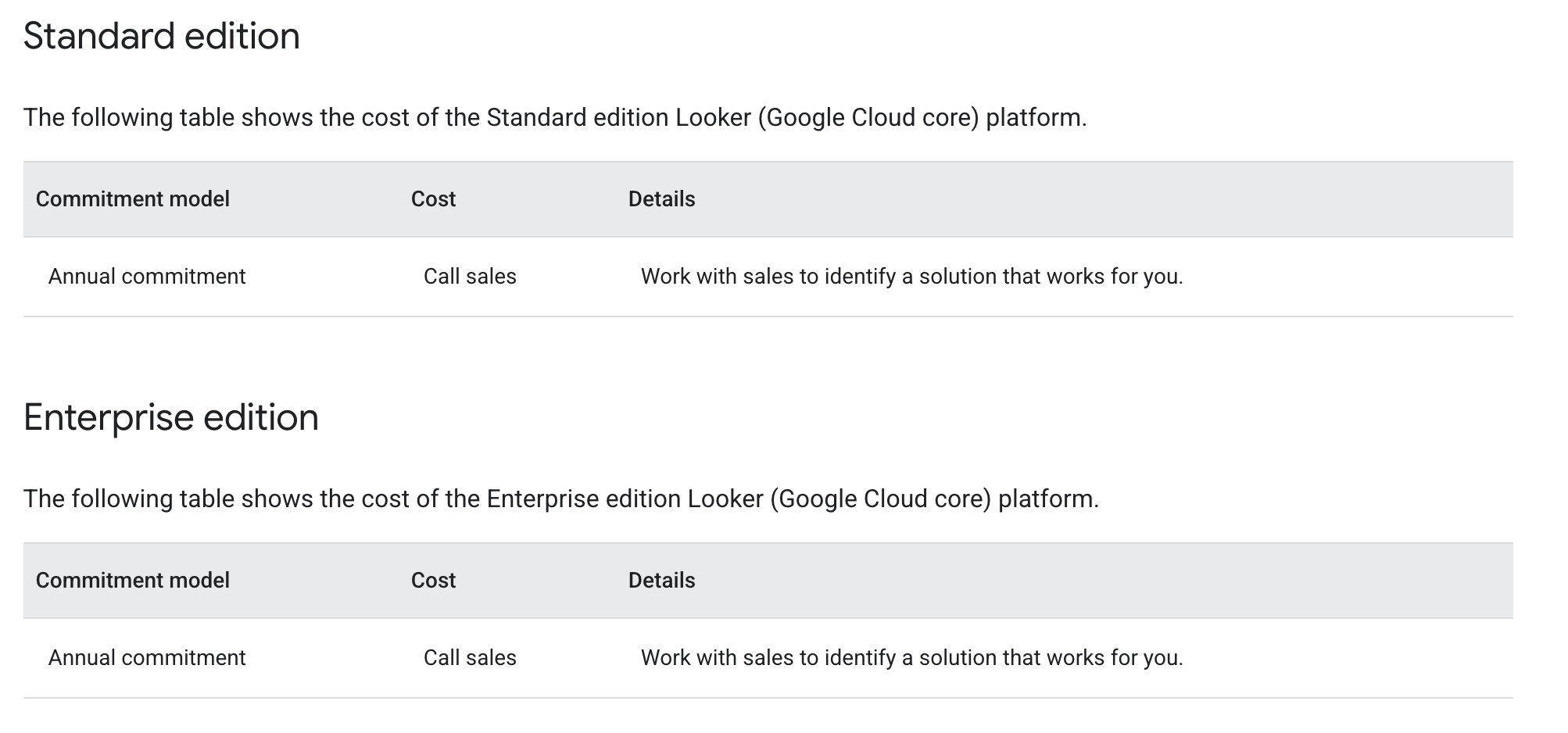
Here's what we do know: Looker pricing starts at around $60,000 per year for the Standard edition. But that's just the beginning. Between user licensing fees, API call limits, and infrastructure costs, your actual spend can climb significantly higher. According to Vendr, a SaaS procurement platform that analyzed 355 Looker deals, the average annual cost sits at $150,000, with some organizations paying upwards of $1.77 million.
This article breaks down everything you need to know about Looker's pricing structure, from platform fees to hidden costs that most vendors won't tell you upfront. We've combed through Reddit discussions, analyzed AWS Marketplace listings, and synthesized community insights to give you the clearest picture possible.
Looker Pricing Overview: What We Know
Google Cloud offers three main Looker editions, each targeting different use cases and organizational sizes:
Standard Edition is designed for small teams with fewer than 50 users. It includes one production instance, 10 Standard Users, 2 Developer Users, and allows up to 1,000 query-based API calls and 1,000 administrative API calls per month.
Enterprise Edition adds enhanced security features for internal BI and analytics needs. You get one production instance, 10 Standard Users, 2 Developer Users, plus significantly higher API limits: up to 100,000 query-based calls and 10,000 administrative calls monthly.
Embed Edition is built for deploying external analytics and custom applications at scale. It comes with one production instance, 10 Standard Users, 2 Developer Users, and the highest API allowances: up to 500,000 query-based calls and 100,000 administrative calls per month.
All editions require annual commitments, and pricing details are only available through direct sales conversations.
According to the AWS Marketplace, the Standard Platform starts at $66,600 annually. The Advanced Platform (similar to Enterprise) runs $132,000 per year, while the Elite Platform (comparable to Embed) costs $198,000 annually.
A recent Reddit discussion confirmed that the Elite package typically lists at around $180,000, though this price is negotiable depending on your company's size and needs.
These base platform fees are just your starting point. What really drives up costs are the add-on user licenses and infrastructure requirements.

Breaking Down Looker's Cost Structure
Understanding Looker's pricing requires looking beyond the platform fee. The real expense comes from user licensing, which follows a tiered model based on what users can do within the platform.
Viewer Users are your most basic license type. According to AWS Marketplace data, these cost $400 per user annually. Viewers can access folders, boards, dashboards, and individual reports. They can filter data and drill down to row-level details, but they can't create new dashboards or looks. For embedded analytics use cases where you're serving dashboards to external customers, this $400-per-viewer fee can become prohibitively expensive. Many companies report skipping Looker entirely for embedded scenarios because of this cost structure.
Standard Users run $799 per user per year. They get everything Viewers have, plus the ability to create dashboards and looks, access the Explore interface, and use SQL Runner. Standard Users can query modeled data and build their own reports, making them ideal for business analysts and data-savvy team members. However, they still can't modify the underlying data model or access Development Mode.
Developer/Admin Users are your power users at $1,665 annually per user. These licenses grant full access to LookML modeling, Development Mode, platform administration, API interfaces, and support. You need Developer licenses for anyone building or maintaining your data model, which means your analytics engineers and data team members will require this tier.
Let's run through a realistic scenario. Imagine you're a mid-sized SaaS company with 50 employees. Your analytics team has 2 developers building the data model, 8 analysts creating reports, and 40 business users consuming dashboards.
- Platform fee (Standard): $66,600
- 2 Developers (included): $0
- 8 Standard Users (10 included, so 0 extra): $0
- 40 Viewer Users: $16,000 ($400 × 40)
Your total annual cost would be $82,600 for the first year. But if you need more Standard Users or Developer seats, those costs add up quickly. Every additional Standard User is $799, and each extra Developer runs $1,665.
API call limits present another consideration. If your Standard edition's 1,000 monthly query-based API calls aren't sufficient, you'll need to upgrade to Enterprise or Embed. This is particularly relevant for embedded analytics implementations where automated queries and programmatic access can quickly exceed basic tier limits.
Hidden Costs You Need to Consider
The platform and user licensing fees are transparent once you get a quote from Looker's sales team. What catches many organizations off guard are the ancillary costs that emerge during implementation and ongoing operation.
Data warehouse query costs can be substantial. Looker doesn't store your data; it queries your cloud data warehouse directly. Whether you're using BigQuery, Snowflake, or Redshift, every dashboard refresh, every Explore interaction, and every scheduled report generates queries against your warehouse. If you're on BigQuery, those query costs are based on data scanned. On Snowflake, it's compute time. Organizations with query-heavy dashboards or lots of concurrent users often see their data warehouse bills spike significantly after implementing Looker. This cost is separate from your Looker subscription but directly tied to how you use the platform.
LookML expertise represents a real investment. LookML is Looker's proprietary modeling language. While it's powerful, it's also specialized. Your team needs to learn it, which means training time and potentially hiring developers who already know it. LookML developers command premium salaries in the market because the skill is specific to Looker. If you're building a complex data model, expect to dedicate significant engineering resources to the task. Some companies report spending months getting their LookML models production-ready.
Additional production instances drive costs higher for larger organizations. The base platform includes one production instance. If you need separate environments for development, staging, and production, or if you operate in multiple regions, each additional instance adds to your bill. The exact pricing varies, but it's a line item that appears frequently in enterprise contracts.
Embedding capabilities come with their own considerations. While the Embed edition is priced higher to account for external-facing analytics, you still need to factor in the per-viewer costs if you're serving dashboards to customers. At $400 per viewer annually, embedding Looker in a product with thousands of users becomes economically challenging. Many companies find that the embedding costs alone make alternative solutions more attractive.
One Reddit user shared their experience: "We were quoted $35K for the base platform, but by the time we added the users we needed and factored in our Snowflake query costs, we were looking at close to $100K annually." This matches the broader market data from Vendr, which shows average annual spending of $150,000 across their sample of 355 deals.
Looker Pricing Compared to Alternatives
When you're spending six figures annually on analytics infrastructure, it makes sense to understand what else is available in the market. Here's how Looker stacks up against major competitors.
Power BI operates on a completely different pricing model. Power BI Pro runs $10 per user per month ($120 annually), while Power BI Premium starts at $20 per user monthly ($240 annually). For organizations already in the Microsoft ecosystem, Power BI Premium Per Capacity offers unlimited viewers for a flat fee starting around $5,000 monthly. The total cost difference is dramatic. A 50-person team on Power BI Pro would pay $6,000 annually versus Looker's $82,600+ for the same scenario.
Tableau sits somewhere between Power BI and Looker. Tableau Creator licenses (needed for content creation) run around $70 per user monthly ($840 annually), while Viewer licenses cost $15 monthly ($180 annually). For our 50-person example, you'd pay roughly $10,000 annually. Tableau's strength lies in its visualization capabilities and ease of use, though it lacks Looker's code-based modeling approach.
GoodData targets the embedded analytics market specifically. Their pricing is consumption-based rather than per-user, which can be more economical for customer-facing analytics scenarios. While exact pricing varies by implementation, GoodData typically comes in below Looker for embedded use cases because you're not paying $400 per external viewer.
Metabase offers both open-source and cloud-hosted options. The open-source version is free, though you'll need to host and maintain it yourself. Metabase Cloud starts at $85 per user monthly for the Pro plan. It's significantly more affordable than Looker but also less feature-rich. Metabase works well for teams that need SQL-based analytics without the complexity of LookML.
For more detailed comparisons, check out Toucan vs Power BI, Toucan vs Sisense, and Toucan vs GoodData breakdowns.
Is Looker Worth The Price?
Whether Looker justifies its cost depends entirely on your specific situation and requirements.
Looker makes sense for large enterprises with complex analytics needs, dedicated data teams, Google Cloud investments, and six-figure analytics budgets. It's likely overkill for small to mid-sized companies, teams without analytics engineering resources, embedded analytics use cases, or organizations seeking quick implementation and easier user adoption.
Drawbacks are significant. The learning curve for LookML is steep. Your team needs dedicated time to learn the language and build models. This isn't drag-and-drop analytics; it's code-based data modeling that requires technical expertise. For smaller teams or organizations without dedicated analytics engineers, this can be a major barrier.
The pricing structure creates challenges for specific use cases. If you're building embedded analytics for customers, the $400-per-viewer annual cost makes Looker economically unfeasible for most scenarios.
Performance can also be an issue, particularly with complex dashboards or large data volumes. Since Looker queries your data warehouse in real-time rather than caching results, slow warehouse performance directly impacts user experience.
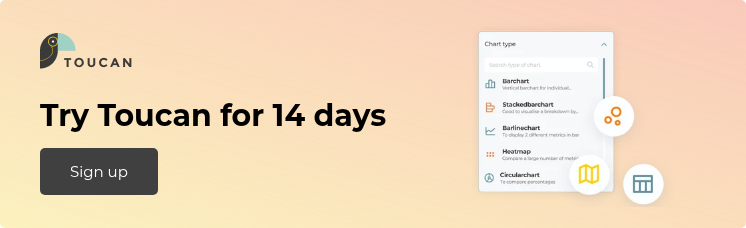
G2 reviews reflect this mixed picture. Users praise Looker's modeling capabilities and data governance features but frequently cite the high cost, steep learning curve, and sometimes sluggish performance as major concerns.
Why Toucan is a Smarter Alternative
If Looker's pricing has you reconsidering your options, Toucan deserves your attention. We've built an embedded analytics platform that addresses many of Looker's shortcomings while delivering capabilities that match or exceed what Looker offers
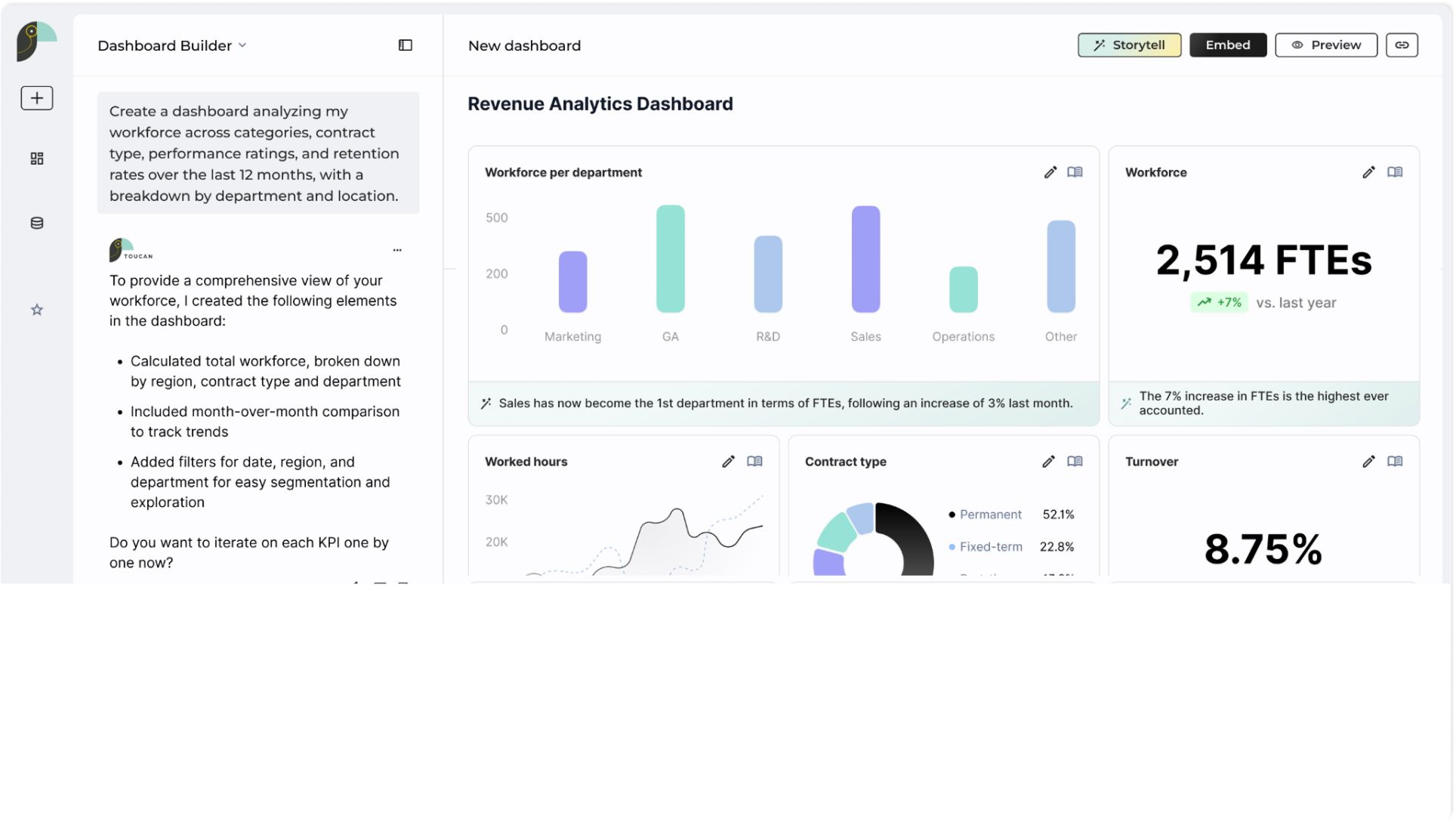
- Transparent, accessible pricing is our starting point. Unlike Looker's opaque sales process, Toucan offers clear pricing tiers that make budget planning straightforward.
- No proprietary languages to learn. While LookML is powerful, it's also a barrier. Toucan uses standard approaches that your team already knows, dramatically reducing implementation time and training overhead.
- Embedded analytics focus sets us apart. Where Looker's per-viewer pricing makes embedded scenarios expensive, Toucan is built from the ground up for customer-facing analytics.
- Faster time to value matters in real business scenarios. Teams typically get their first Toucan dashboards into production in weeks, not months.
Organizations moving from Looker to Toucan frequently cite cost savings of 40-60% while gaining capabilities specific to their embedded analytics needs. Your team gets more productive, your users get better experiences, and your CFO stops asking why the analytics bill is so high.
Conclusion
Looker is a powerful platform with genuine strengths, particularly for large enterprises with complex needs and Google Cloud investments. But it's not the only option, and for many use cases, it's not the best option.
If Looker's pricing doesn't align with your budget or use case, explore alternatives built for your specific needs. Whether that's Power BI for Microsoft shops, Tableau for visualization-focused teams, or Toucan for embedded analytics scenarios, the right tool exists for your situation.
Ready to see what a purpose-built embedded analytics platform can do? Explore Toucan during a free trial and discover how you can deliver better analytics at a fraction of Looker's cost.
FAQ