
Toucan's MCP Analytics Agent: Give a Data Brain to your AI Agent
.jpg?width=88&height=88&name=PORTRAIT_David_face%20(1).jpg)
David Nowinsky
Publié le 16.06.26
Mis à jour le 18.06.26
2 min
Your favorite LLM can now query your data, build charts, and explore schemas. It runs on the same typed tools that power Toucan’s assistant.
The Model Context Protocol (MCP) has quickly become the standard way for AI agents to talk to external systems. The promise is simple: instead of building a custom integration for every tool, you plug your agent into a shared protocol and it gains real capabilities.
The hard part isn’t the protocol. It’s what sits behind it.
Most MCP servers expose generic utilities: file access, web search, calendar APIs. Useful, but not what product teams need when they want an agent that can answer “What was our revenue last quarter?” with a real number from a real database.
Today we’re announcing Toucan’s MCP server: a direct bridge between any MCP-compatible agent and your connected data sources, semantic layer, and chart engine. Same security model. Same validation. Same tools that run inside Toucan’s multi-agent assistant. Just exposed over a standard HTTP endpoint your agent can call.
One protocol, the full analytics workflow
When you connect an agent to Toucan’s MCP endpoint, it doesn’t get a thin wrapper around SQL. It gets the same seven tools our AI assistant uses every day:
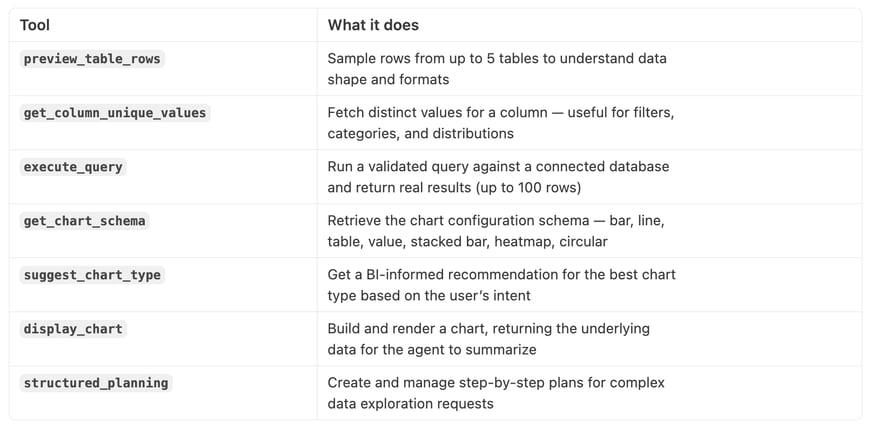
That’s the full loop: explore → query → visualize → explain. Not a demo dataset. Not guessed numbers. Results from your PostgreSQL or BigQuery connections, validated before they execute.
Built on what we already run in production
We didn’t build a separate MCP surface from scratch. Toucan’s MCP server registers the exact same LangChain tools that power our in-product AI assistant, with Zod schemas for every input, organization-scoped auth on every call, and structured error responses when something goes wrong.
Under the hood, the server is called toucan-ai-tools and exposes tools over HTTP using the standard MCP JSON-RPC transport. Requests hit /api/mcp, authenticated with a bearer token generated server-side from your API key, scoped to your organization and, if you want RLS to apply, to your end user’s attributes.
const result = await tool.invoke(args ?? {}, {
context: {
auth: authContext,
locale: "en",
},
});
If you’re already using Toucan for embedded analytics, this should feel familiar. Row-level security and user attributes from embed tokens flow through to query execution the same way they do in the web component. The agent gets capabilities; your data stays governed.
Getting started
Quick reminder if you’re new here: Toucan is an embedded analytics platform. SaaS products use it to ship customer-facing dashboards and a conversational AI assistant without building BI infrastructure in-house.
The MCP server lives at a single endpoint:
POST https://toucanai.cloud/api/mcp
Authenticate with a bearer token: generate one server-side from your API key, scoped to your organization (and to your end user’s attributes if you want RLS to apply). Your agent discovers available tools automatically through the MCP protocol. No manual tool configuration required.
Supported data sources today: PostgreSQL and Google BigQuery (read-only). More connectors are on the roadmap.
Already a Toucan customer? Reach out to your account team or check the docs for API key setup. Looking to plug this into your own product’s AI chat instead of a tool like Cursor or Claude Desktop? The integration guide covers token generation and rendering charts in your UI.
Curious what your own agent could do with real data behind it?
See it in action ↗
.jpg?width=112&height=112&name=PORTRAIT_David_face%20(1).jpg)
