Toucan Self-Service: Let Users Build Dashboards by Chat, Without Crossing Tenants

Alim Goulamhoussen
Publié le 17.06.26
Mis à jour le 18.06.26
3 min
Every product team eventually hears the same request: “Can I just ask a question and get an answer?”
Not a ticket to the data team. Not a detour into a separate BI tool. Not a static report that was built six months ago. Just a simple question, answered with real data, inside the product they already use.
That is what Toucan Self-Service is for.
Embed a conversational AI assistant directly into your application, and let your end-users explore data, generate charts, and build dashboards through natural language. All governed by the security rules you define. All running inside your product UI. No Toucan platform access required.
Self-service that lives in your product
Most analytics tools assume your users will leave your app to find answers somewhere else.
Toucan flips that model. With the <tc-ai-assistant> web component, you give Explorers, your end-users inside the embedded product, a native chat experience inside your product. They ask questions in plain language. Our AI assistant explores schemas, runs validated queries, picks chart types, and returns tables and visualizations grounded in live data.
The experience is conversational, but the output is not a guess. Every answer comes from a real query against your connected databases.
From question to chart to dashboard
Self-Service is not limited to one-off questions.
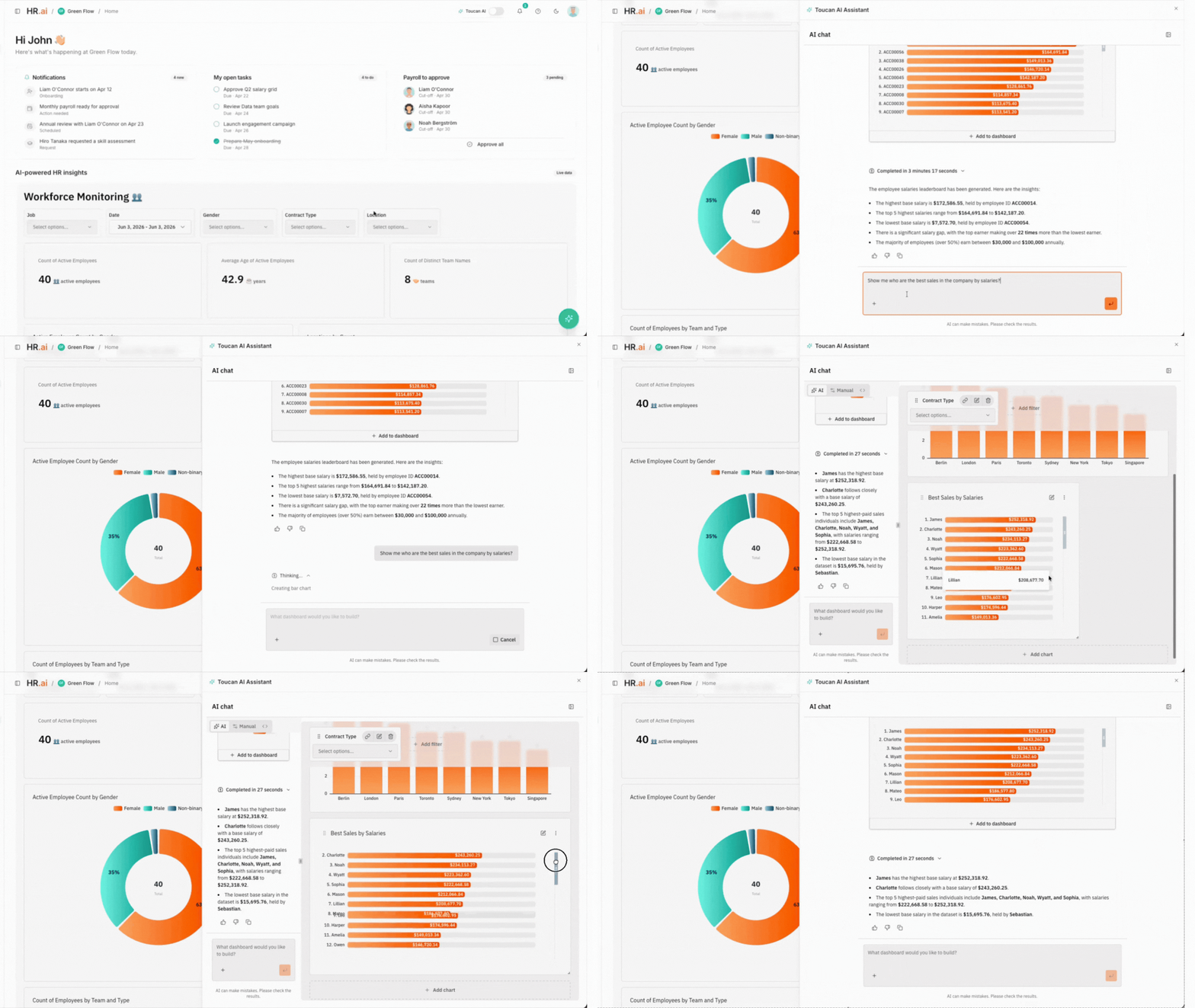
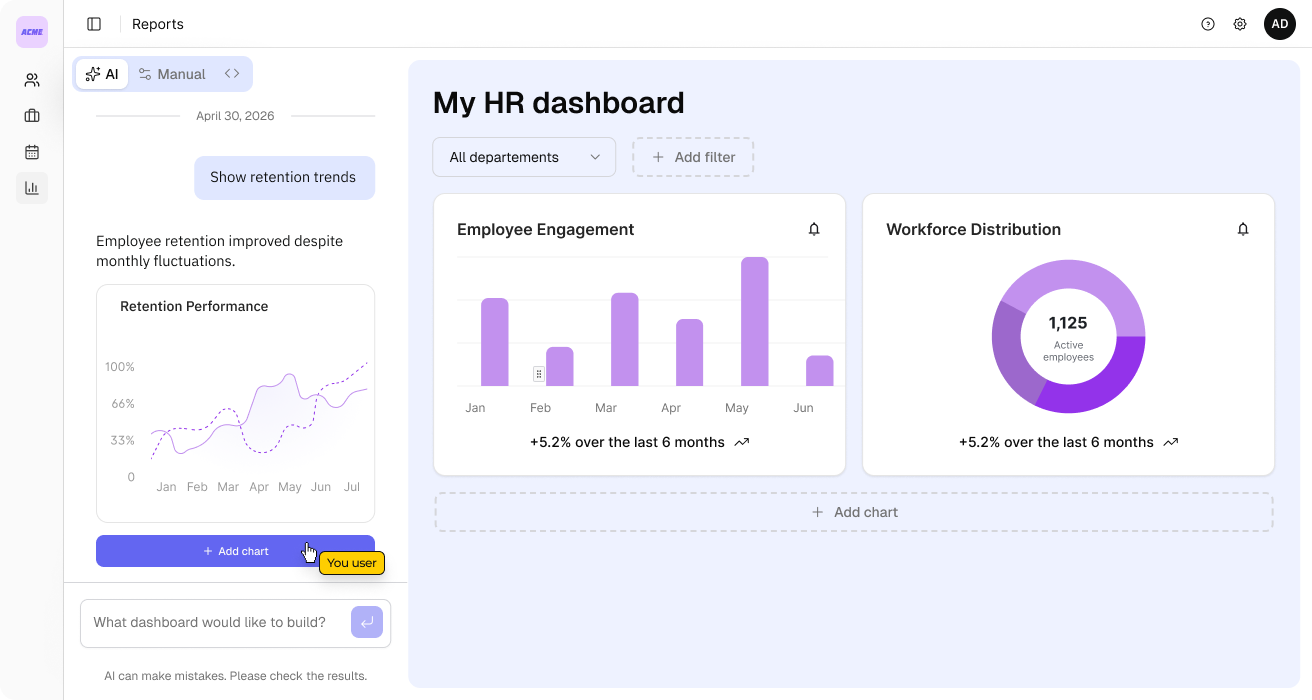
When a user asks something simple, like “How many hires did we make last quarter?”, the assistant returns a clear answer, often with a chart. When they go further, like “Show me our most important HR metrics” or “Build me a dashboard with key KPIs”, the assistant plans a multi-step flow: explore the data, build the right queries, generate several visualizations, and lay out a credible starting point.
That’s not a single chart suggestion the user has to assemble by hand. It’s a complete, laid-out dashboard, built end to end from one sentence in chat.
Charts created in chat can be added to a dashboard. Users iterate in conversation, refine what they see, and keep building without writing SQL or opening a separate analytics workspace.
That is the full loop: explore, query, visualize, explain, and build.
Answers you can trust
Fast AI is only useful if you can stand behind the results.
Toucan Self-Service runs on the same multi-agent engine we use in production. An orchestrator delegates to specialized agents for exploration and query building. Queries are validated before execution. Chart configurations are validated before rendering. The assistant never fabricates numbers. If the data is not there, it says so.
On top of that, every session is scoped by your authentication model:
- Embed tokens define who the user is and what attributes they carry.
- Row-Level Security (RLS) filters every query based on those attributes.
- Dataset permissions control what data is in scope.
In a multi-tenant SaaS product, that means two customers can ask the same question and each sees only their own data. The AI works fast. Your governance rules still apply.
Built for product teams, not just analysts
Most BI platforms are optimizing dashboard building for analytics teams inside the organization.
Toucan Self-Service is built for a different job: customer-facing and in-product analytics.
You connect your PostgreSQL or BigQuery sources, enrich your metadata with AI, configure RLS, generate a token server-side, and embed the assistant with a few lines of code:
<link rel="stylesheet" href="https://toucanai.cloud/embed/embed.css" />
<tc-ai-assistant
auth-token="YOUR_AUTH_TOKEN"
server-url="https://toucanai.cloud/api"
data-theme="light"
></tc-ai-assistant>
Your users never need to know Toucan exists. They just get a chat that feels native to your product.
What end-users can do today
Here are a few examples of what Self-Service supports out of the box:
- “What data do I have access to?”
- “How did revenue change month over month?”
- “Show me headcount by department as a chart.”
- “What are our top 5 products by sales?”
- “Build me a dashboard with our key metrics.”
- “Add another chart for employee turnover.”
The assistant handles the technical work. Your users stay focused on the business question.
A real example: HR SaaS
Imagine an HR platform serving hundreds of companies.
You pass a customer_id in the embed token. You map it to the right column through RLS. An HR manager opens your app, opens the embedded chat, and asks: “How many hires did we make last quarter?”
Toucan runs the query, applies the tenant filter automatically, and returns the answer with a chart. No SQL. No BI login. No risk of cross-tenant data leakage.
Ask it to go further, “build me a hiring dashboard”, and the same manager gets a full, laid-out dashboard, not a single chart to expand later.
That is self-service analytics as a product feature, not a side project.
Start embedding self-service today
Toucan Self-Service is available for teams embedding analytics into their products.
To get started, you need:
- At least one connected database (PostgreSQL or BigQuery).
- An API key for server-side token generation.
- Recommended: AI-enriched metadata and RLS configured for your use case.
New to Toucan? Start a free trial to connect a database and try it yourself.
If you are already a Toucan customer, check the embed docs or reach out to your account team. If you are evaluating embedded analytics with a conversational layer, book a demo and we will show you Self-Service in action, inside a real product flow.
The next time your users ask for answers in your product, let them ask the AI instead.